UI-UX Design with Agentic AI and GenAI Course: The Future of Product Design
The digital product landscape is changing rapidly with the emergence of Artificial Intelligence, Generative AI, and Agentic AI. Today, designers are no longer limited to traditional wireframing, prototyping, and visual design workflows. AI-powered tools are transforming how designers research, ideate, create, test, and improve digital experiences.
UI-UX Design with Agentic AI and GenAI Course combines human-centered design principles with intelligent AI systems to create faster, smarter, and more personalized digital products. This new approach enables designers to automate repetitive tasks, generate design concepts, analyse user behaviour, create prototypes, and even build intelligent experiences that can make decisions autonomously.
For aspiring designers, product designers, UI/UX professionals, and technology enthusiasts, learning UI-UX Design with Agentic AI and GenAI Course can create exciting career opportunities in the rapidly evolving digital industry.
Weekend UX offers a future-focused learning approach that combines UI/UX Design, Product Design, Generative AI, Agentic AI, design systems, user research, prototyping, and modern digital product development methodologies.
What Is UI-UX Design with Agentic AI and GenAI Course?
UI-UX Design with Agentic AI and GenAI Course refers to the integration of Artificial Intelligence into the complete UI/UX design process.
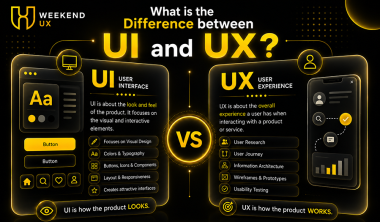
UI, or User Interface Design, focuses on how a digital product looks and behaves visually. UX, or User Experience Design, focuses on how users interact with a product and whether that experience is useful, accessible, intuitive, and enjoyable.
Generative AI adds another dimension by allowing designers to generate text, images, layouts, design ideas, user flows, personas, content, and prototypes using natural-language prompts.
Agentic AI goes one step further. Instead of simply generating an output based on a prompt, AI agents can understand goals, plan tasks, use tools, make decisions, execute multiple steps, and continuously improve their work.
Therefore, UI-UX Design with Agentic AI and GenAI Course is not simply about using ChatGPT or an AI image generator. It is about developing a modern design workflow where human creativity and AI intelligence work together.
Why Is AI Changing UI/UX Design?
Traditional UI/UX design can involve extensive research, documentation, brainstorming, wireframing, prototyping, usability testing, visual design, and iteration.
AI can accelerate many of these activities.
For example, a designer can use Generative AI to:
Generate user personas
Create user journey hypotheses
Analyse interview transcripts
Generate UX research questions
Produce information architecture ideas
Create wireframe concepts
Generate UI copy
Explore visual styles
Create design variations
Generate usability testing scenarios
Summarize research findings
Identify potential UX problems
Agentic AI can potentially coordinate several of these activities as part of a larger workflow.
This means designers can spend less time performing repetitive production tasks and more time focusing on strategy, creativity, problem-solving, research, and decision-making.
Generative AI in UI/UX Design
Generative AI has become an important part of the modern design toolkit.
Instead of beginning every project from a blank canvas, designers can use AI to rapidly explore multiple possibilities.
AI-Assisted UX Research
Research is one of the most important stages of product design. AI can help organize large amounts of qualitative and quantitative information.
Designers can use AI to analyse:
Customer interviews
Survey responses
Support tickets
Reviews
Product feedback
User behaviour data
Competitor information
However, designers still need to validate AI-generated insights against real user evidence.
AI-Powered Ideation
Designers often need to generate multiple solutions before selecting the best one.
Generative AI can act as an ideation partner.
For example, a designer working on a banking application could ask AI to generate different approaches for:
Account dashboards
Payment flows
Transaction history
Budgeting features
Financial alerts
Onboarding experiences
The designer then evaluates these ideas based on user needs, business goals, accessibility, technical feasibility, and usability.
AI-Generated Wireframes
Instead of manually creating every initial screen, designers can describe a product requirement and generate an initial concept.
These outputs should be treated as starting points rather than final designs.
Professional designers remain responsible for information architecture, interaction design, accessibility, hierarchy, usability, and visual consistency.
What Is Agentic AI?
Agentic AI represents a major evolution from traditional AI assistants.
A conventional AI system generally responds to a specific instruction.
An AI agent can work toward a broader objective by:
Understanding the goal
Breaking the goal into tasks
Planning an approach
Using available tools
Executing actions
Evaluating results
Adjusting the approach
Producing an outcome
This capability has important implications for product and UX designers.
An agentic workflow could potentially analyse research data, examine user journeys, identify friction points, compare patterns, suggest improvements, and prepare recommendations.
The designer remains the decision-maker, while the AI becomes an intelligent collaborator.
How Agentic AI Can Transform UX Workflows
UI-UX Design with Agentic AI and GenAI Course can introduce AI into multiple stages of the product development lifecycle.
1. Research
AI agents can help organize research information and identify patterns across large datasets.
2. User Personas
Generative AI can help create initial persona frameworks based on research inputs.
3. User Journey Mapping
AI can suggest possible customer journeys and identify friction points.
4. Information Architecture
AI can generate alternative navigation structures based on product requirements.
5. Wireframing
AI-assisted tools can accelerate early-stage layout exploration.
6. Prototyping
Designers can use AI to rapidly create interactive concepts.
7. Content Design
Generative AI can create UI copy, microscopy, error messages, onboarding content, and product descriptions.
8. Usability Testing
AI can help create testing scenarios and summarize qualitative feedback.
9. Design Iteration
AI can generate alternative solutions and help designers compare different approaches.
This creates a more efficient product design workflow while keeping human judgment at the centre.
UI-UX Design with Agentic AI and GenAI Course for Product Designers
Product designers are increasingly expected to understand both design and technology.
Modern product design involves more than creating attractive interfaces.
A product designer needs to understand:
User problems
Business objectives
Product strategy
Technology constraints
Design systems
Accessibility
Data
AI capabilities
Customer behaviour
Conversion
Product metrics
Learning UI-UX Design with Agentic AI and GenAI Course allows product designers to expand their capabilities.
Instead of simply designing screens, designers can participate in building intelligent product experiences.
For example, an AI-powered healthcare application could personalize information based on user needs.
A fintech product could use AI to provide personalized financial insights.
An e-commerce platform could use AI to create intelligent recommendations.
A SaaS platform could use AI agents to automate repetitive workflows.
In each case, UX designers must ensure that the AI interaction is understandable, predictable, transparent, accessible, and trustworthy.
Designing AI-Powered User Experiences
Designing AI products introduces new UX challenges.
Traditional interfaces are generally predictable. A user clicks a button and receives a defined result.
AI systems can be more dynamic.
The same prompt can potentially produce different outputs.
Therefore, designers need to think about:
AI transparency
Explainability
User control
Feedback
Error handling
Trust
Privacy
Accessibility
Human oversight
Personalization
For example, if an AI agent makes an important recommendation, the user should understand why that recommendation was made whenever appropriate.
Good AI UX should not make users feel that they have lost control.
Human-Centered AI Design
Even with powerful AI tools, human-centered design remains essential.
AI should support people rather than create unnecessary complexity.
A strong AI product experience should answer questions such as:
What is the AI doing?
Why is it doing it?
What can the user control?
What happens if the AI makes a mistake?
Can the user undo an action?
Can the user provide feedback?
These questions become especially important when designing Agentic AI experiences.
Designers need to establish clear boundaries between autonomous actions and human decisions.
Essential Skills for UI-UX Designers in the AI Era
The future designer will require a combination of traditional design and emerging AI skills.
UX Research
Understanding users remains fundamental.
UI Design
Strong visual hierarchy, typography, layout, color, grids, and interaction design are still important.
Product Thinking
Designers must understand business goals and product strategy.
Design Systems
AI-generated interfaces still need consistency and scalable component systems.
Prompt Engineering
Designers should understand how to communicate effectively with AI systems.
Generative AI
Understanding text, image, design, and multimodal AI tools can increase productivity.
Agentic AI
Designers should understand how AI agents work and how users interact with autonomous systems.
Prototyping
Rapid experimentation is increasingly important for AI-powered products.
AI UX
Designers need to understand how to create trustworthy and usable AI experiences.
Tools Used in AI-Powered UI/UX Design
The AI design ecosystem is expanding rapidly.
Depending on the workflow, designers may work with:
Figma and AI-powered design capabilities
ChatGPT
Claude
Gemini
Midjourney
Adobe Firefly
AI wireframing tools
AI prototyping platforms
No-code AI tools
Design research assistants
AI coding assistants
Agent frameworks
Multimodal AI systems
The objective should not be to learn every tool.
Instead, designers should understand which tool solves which problem.
Tools will continue to change, but design fundamentals remain valuable.
Career Opportunities After Learning UI-UX and AI
The combination of UI/UX and AI can open opportunities across multiple roles.
AI Product Designer
Design interfaces and experiences for AI-powered products.
UX Designer
Research and design user-centered digital experiences.
UI Designer
Create visually engaging and consistent interfaces.
Product Designer
Own end-to-end product experiences.
UX Researcher
Study user behaviour and translate insights into product improvements.
AI Experience Designer
Focus specifically on interactions between people and intelligent systems.
Conversational UX Designer
Design experiences for chatbots, voice interfaces, and conversational AI.
Design Systems Designer
Create scalable systems for digital products.
AI Design Consultant
Help organizations integrate AI into their product and design workflows.
Why Choose Weekend UX?
Weekend UX focuses on preparing designers for the evolving requirements of the digital product industry.
Instead of treating UI/UX as only a visual design discipline, the learning approach can combine:
UI/UX Design
Product Design
UX Research
Design Systems
Prototyping
Generative AI
Agentic AI
Prompt Engineering
AI-powered workflows
Product thinking
Usability testing
Accessibility
Portfolio development
The objective is to help learners understand how design works in real-world product environments.
For students, working professionals, freelancers, entrepreneurs, and aspiring product designers, combining design fundamentals with AI capabilities can create a stronger foundation for the future.
Learning UI-UX Design with Agentic AI and GenAI Course
A structured learning journey should begin with design fundamentals before moving into advanced AI workflows.
Phase 1: UX Fundamentals
Learn user research, personas, journey maps, information architecture, interaction design, and usability.
Phase 2: UI Design
Learn typography, color, grids, visual hierarchy, responsive design, components, and design systems.
Phase 3: Product Design
Understand product strategy, business objectives, user problems, product metrics, and end-to-end product development.
Phase 4: Generative AI
Learn how AI can support research, ideation, content generation, visual exploration, prototyping, and documentation.
Phase 5: Agentic AI
Understand AI agents, workflows, automation, decision-making, tool usage, and human-agent collaboration.
Phase 6: AI Product Experience
Learn how to design trustworthy, accessible, transparent, and human-centered AI experiences.
Phase 7: Portfolio Projects
Build real-world projects demonstrating both design thinking and AI capabilities.
This progression creates a balanced skill set instead of focusing exclusively on tools.
The Future of UI/UX Design
AI is unlikely to eliminate the need for good designers. Instead, it is changing what designers are expected to do.
Routine production tasks are increasingly becoming automated.
As a result, skills such as strategic thinking, creativity, empathy, problem-solving, communication, research, and product thinking become even more valuable.
The future designer may work alongside AI agents throughout the product lifecycle.
A designer might ask an AI system to analyse research, generate concepts, create alternatives, simulate user scenarios, and prepare documentation.
But the designer still needs to decide:
What problem should we solve?
Who are we solving it for?
Is this solution actually useful?
Is it ethical?
Is it accessible?
Does it create business value?
That is where human-centered design continues to matter.
Conclusion
UI-UX Design with Agentic AI and GenAI Course represents a significant shift in how digital products can be researched, designed, tested, and improved.
Generative AI can accelerate ideation and production, while Agentic AI can introduce more autonomous workflows capable of planning and executing multiple tasks.
However, successful AI-powered products still require strong design thinking.
Designers who combine UX fundamentals with AI literacy, product thinking, research, interaction design, and strategic problem-solving will be better prepared for the next generation of digital products.
With Weekend UX, learners can build a future-ready foundation by exploring UI/UX Design, Product Design, Generative AI, Agentic AI, prototyping, research, and modern design workflows.
The future of design is not simply AI replacing designers.
It is designers using AI to become more strategic, creative, productive, and capable of solving complex problems.